Announcement
Flux 2: A 110GB Model Now Running on One H100 and 4.2× Faster!

John Rachwan
Cofounder & CTO

Gaspar Rochette
ML Research Engineer

Louis Leconte
ML Research Engineer

Simon Langrieger
ML Research Intern

Johanna Sommer
ML Research Engineer

David Berenstein
ML & DevRel Engineer

Sara Han Díaz
DevRel Engineer

Minette Kaunismäki
DevRel Engineer

Bertrand Charpentier
Cofounder, President & Chief Scientist
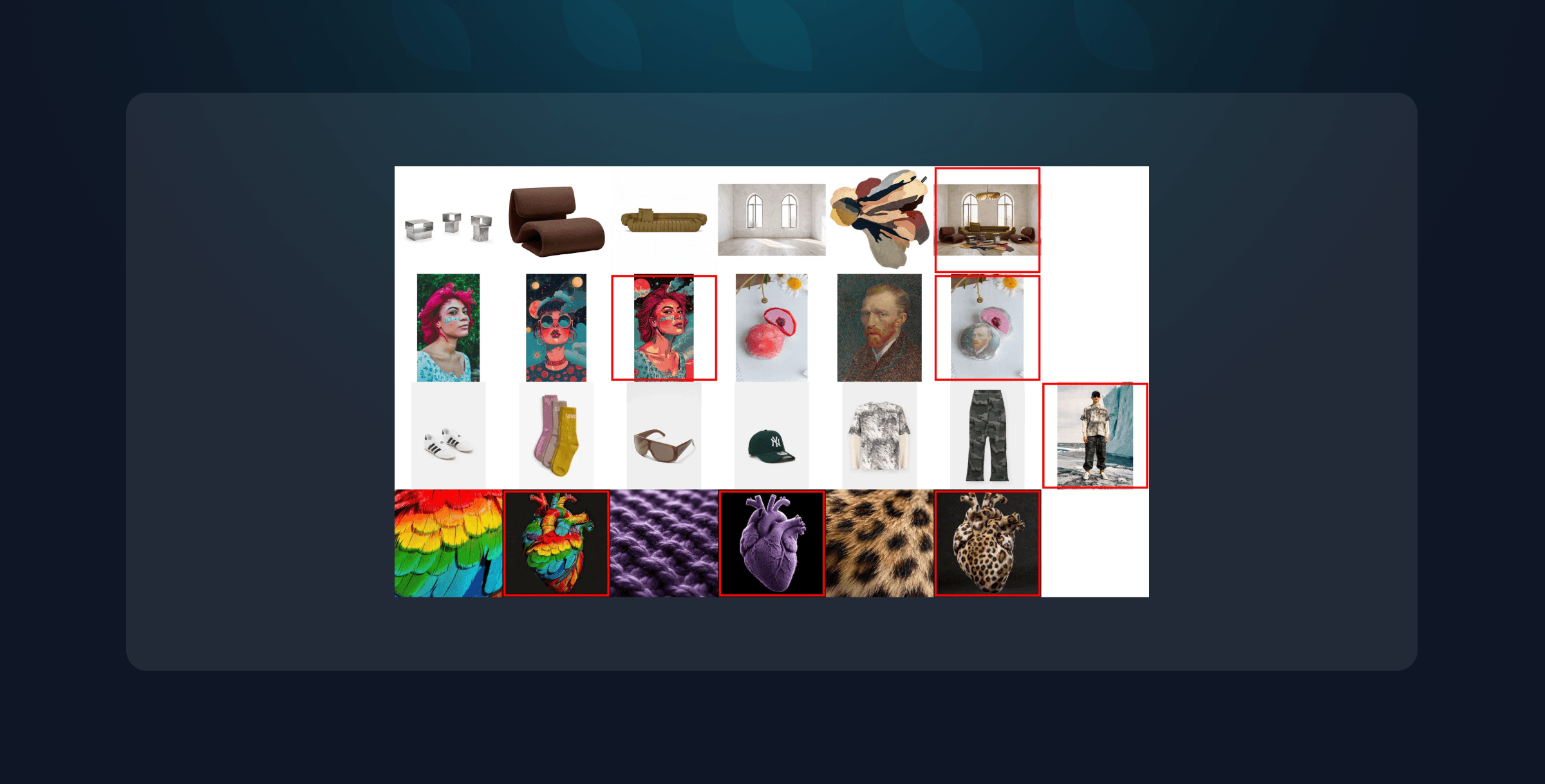
Flux 2 has arrived with its Dev version now open weights, and it’s a massive leap forward for image generation. It brings a whole new wave of features for creative control, photorealism, and workflow flexibility. You can try it on the endpoint made possible by the joint work of Black Forest Labs, Replicate, and Pruna.
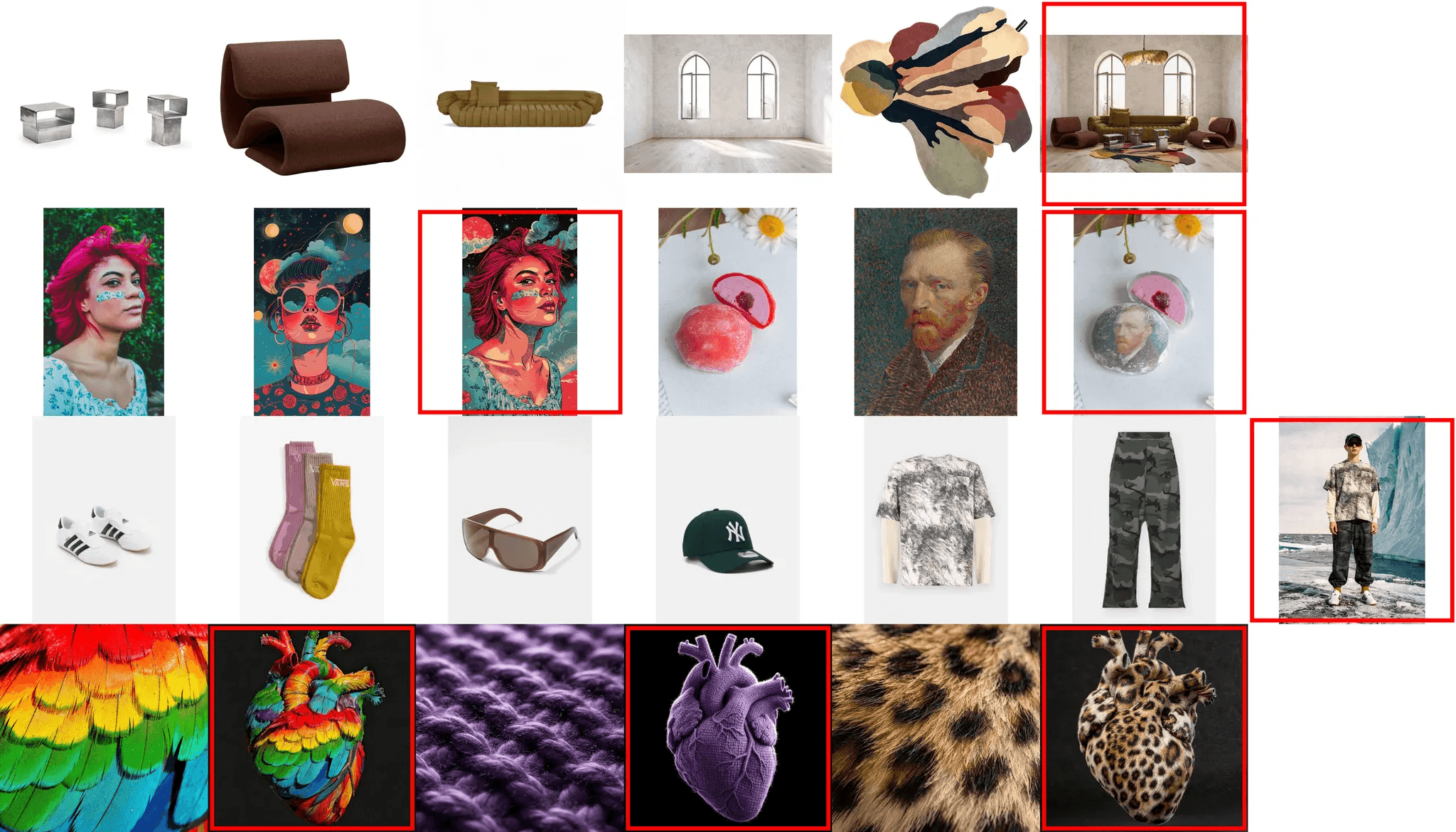
What’s new in Flux 2 Dev?
Higher Quality: Flux 2 pushes photorealism further with
Up to 4MP resolution, delivering crisp details in faces, hands, fabrics, materials, and small objects.
More accurate lighting, physics, and spatial logic, producing scenes that feel grounded and coherent.
Real-world knowledge improvements, enabling more realistic compositions for e-commerce, product marketing, interiors, creative photography, and more.
Stable, high-fidelity rendering that reduces artifacts and closes the gap to real photography.
Higher Control: Designed for professional creative workflows with:
Multi-reference support (up to 8 images) for consistent characters, products, and styles across full campaigns.
Precise editing tools such as pose guidance, localized edits, clean background replacement, and accurate object insertion with proper perspective.
Brand-grade precision, including hex-code color matching and reliable text rendering for UI, infographics, and design layouts.
Structured prompting (JSON, long prompts up to 32K tokens) for programmatic and large-scale pipelines.
Flexible outputs, including any aspect ratio, image expansion/cropping, and post-generation edits.
Flux 2 is an incredible step forward—but there’s a challenge…
The Challenge: Flux 2 Dev Is Big
The Dev model currently weighs 110GB, making it too large to fit on a single H100 (80GB). The generation speed is 10-11 seconds per image on a B200, which puts it out of reach for many teams. In its raw form, Flux 2 Dev simply isn’t affordable or deployable for the majority of builders.
So we asked: How can we make Flux 2 Dev accessible for everyone?
We optimized it.
We deployed it.
We evaluated it.
We worked together with Black Forest Labs and Replicate, and now…
Flux-2-Dev Fits on a Single H100 and Runs in ~2.5 Seconds — With Pruna AI! Thanks to Pruna AI’s inference-optimization stack, Flux 2 becomes usable for real-world products, creative teams, and production workloads.
The Inference Optimization: Combining State-of-the-Art algorithms.
To compress and accelerate Flux 2, we stacked multiple state-of-the-art optimization techniques — including caching, factorization, quantization, compilation, and several proprietary tweaks. This layered approach lets us squeeze out maximum efficiency without compromising output quality.
If you want to dive deeper into these methods, the Pruna library (GitHub, documentation) provides a comprehensive overview (and don’t forget to give it a ⭐)!
In a couple of days, we explored, benchmarked, and validated the best combination of inference optimization techniques to give maximum efficiency gains — all while keeping Flux 2 Dev’s generation quality unchanged…
The Model Size: One H100 with 80GB Now Run Flux 2.
Flux 2 Dev is big — it requires 110 GB of memory just to load the base model. This means even a single H100 80 GB GPU can’t host it without optimization. Out of the box, you need at least a B200 with 190 GB to run the model, which dramatically increases deployment cost.
When you look at the evolution of open-source image generation models, Flux 2 clearly sits near the top of the size spectrum:
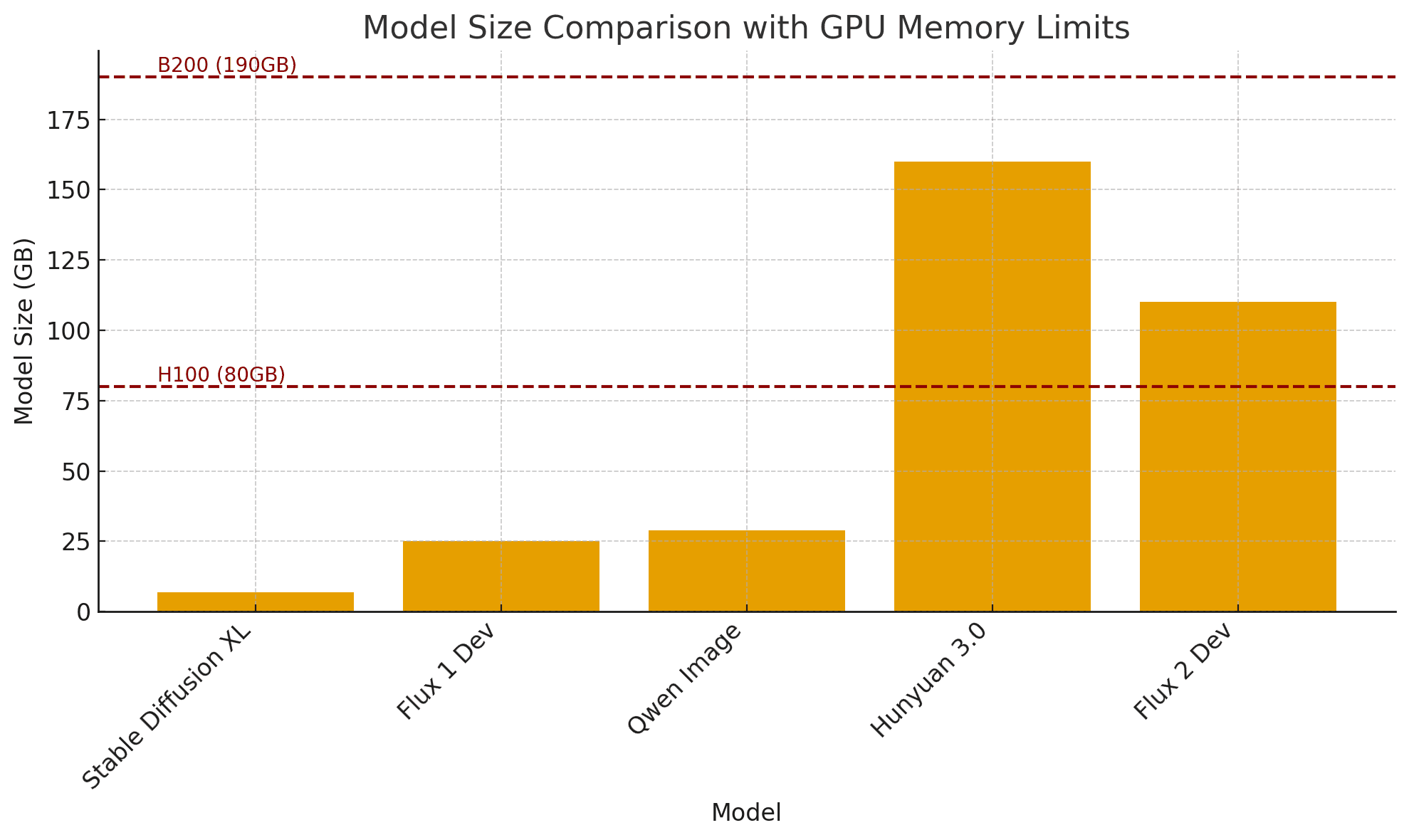
With our compression pipeline, we reduced Flux 2 enough to fit comfortably on a single H100 80 GB GPU — without compromising image quality
The Model Speed: From 11s on B200 to 2.6s on H100!
Flux 2 Dev is slow in its raw form. Generating a 1 MP image takes 11s even on a B200, and the latency grows quickly for higher resolutions or when using multiple image references. While Flux 2 delivers exceptional image quality, its default speed makes true interactive, near–real-time generation impossible.
B200 - Base | B200 - Compiled | H100 - Base | H100 - Optimized | |
|---|---|---|---|---|
Flux 2 Dev - Latency for 1MP Image Generation | 10-11s | 7-8s | Out of Memory | 2.6s |
You might be curious how Flux 2 Dev compares to other model endpoints in terms of speed. For broader benchmarks across many models and providers, check out the early benchmarks on InferBench. We’ll keep refreshing the numbers as updated versions of the models roll out.
With our acceleration pipeline, Flux 2 Dev now generates a full 1 MP image in 2.5 seconds on a single H100 — unlocking near–real-time workflows. The optimized Flux 2 runs 4.2x faster on one H100 than the base model on one B200. Check out the latency measurement on InferBench!
The Quality: Controlling Image Realism in High Resolution
Flux 2 Dev produces exceptionally high-quality images with fine-grained control over composition, lighting, style, and references. And of course — the best way to judge quality is simply to look at the results for Flux 2. You can check a lot of cool examples on this gallery page, where we compare Flux 2 Pro, Flux 2 Dev, Flux 1.1 Pro, Flux 1.1 Dev, and Flux Schnell!

But visuals alone aren’t enough. We also care deeply about quantitative evaluation. That’s why we are expanding the metrics available on InferBench to provide a more complete view of image quality across models and providers, including Flux 2. These numbers will be refreshed when updated versions of the models are published.
Enjoy the Quality and Efficiency!
Want to take it further?
Compress your own models with Pruna and give us a ⭐ to show your support!
Try our Replicate endpoint with just one click.
Stay up to date with the latest AI efficiency research on our blog, explore our materials collection, or dive into our courses.
Join the conversation and stay updated in our Discord community.
・